
Modeway Cart Recovery & Revenue Booster: Official Knowledge Base & Documentation
Modeway Cart Recovery & Revenue Booster: Official Knowledge Base & Documentation
Main Dashboard & Session Management
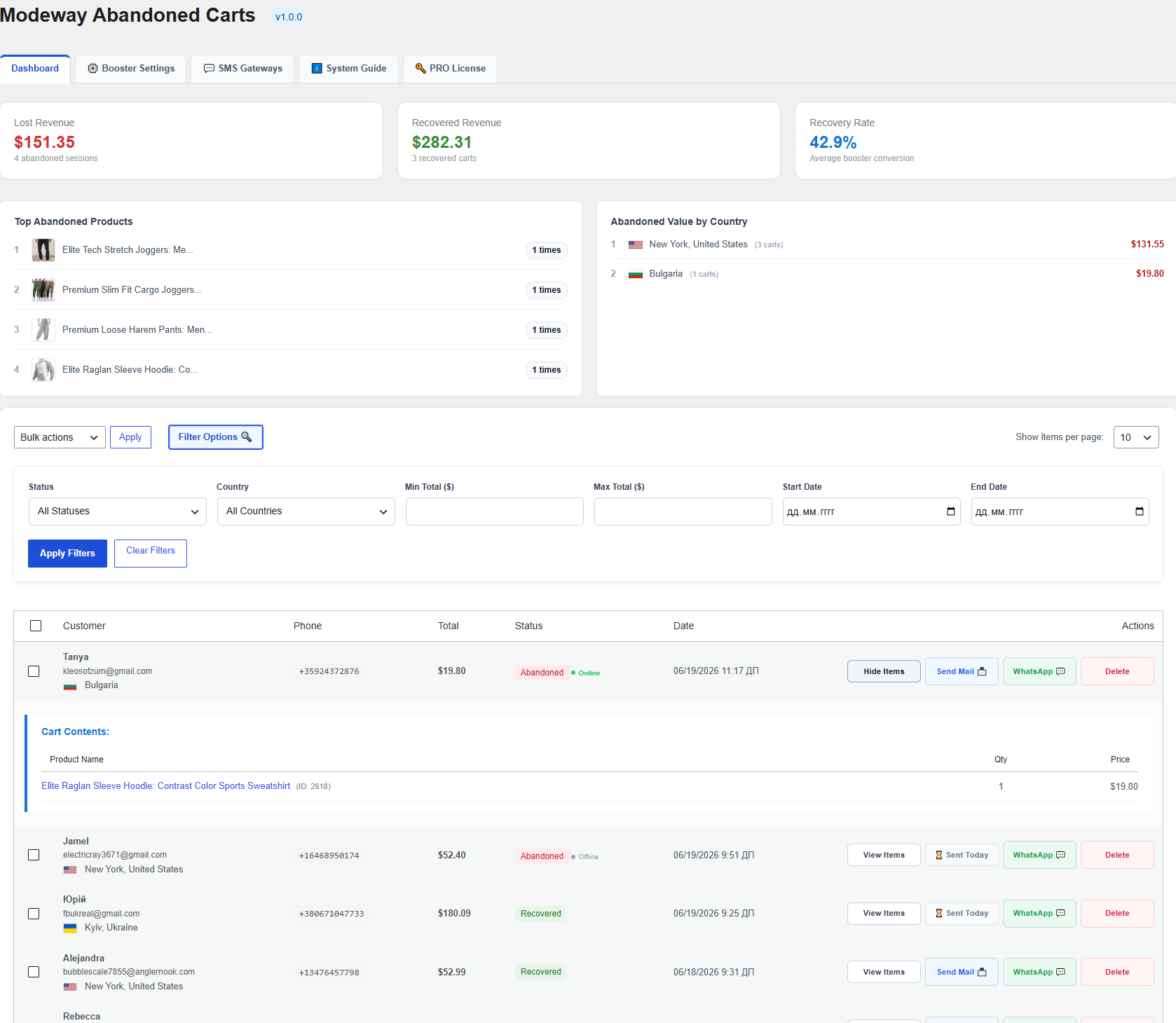
The Modeway core workspace combines powerful analytical tools and an interactive live session table to give you total control over abandoned checkout sequences.
Key Performance Indicators (KPI Widgets)
- Lost Revenue: The cumulative total value of abandoned carts where orders have not yet been completed.
- Recovered Revenue: The financial total of successfully recovered orders driven by your Modeway marketing triggers.
- Recovery Rate %: The conversion rate of returning shoppers. This demonstrates the net efficiency of the plugin.
Analytics Leaderboards
- Abandoned Value by Country: Distribution of lost revenue by country, complete with built-in geo-location flags. This allows you to adjust regional sales strategies instantly.
- Recovered Revenue: The financial total of successfully recovered orders driven by your Modeway marketing triggers.
Interactive Tracking & Data Protection (GDPR Compliance)
- Real-Time Activity: Every cart row features a live activity indicator (● Online / ● Offline), showing whether the customer is currently active on the checkout page.
- On-the-Fly Guest Data Capture: The plugin intercepts guest users' names, emails, and phone numbers in real time as they type into checkout fields—well before they ever click the final order button.
- Cart Content Viewer: Clicking the View Items button immediately expands the Cart Contents block, revealing a full breakdown of products, SKUs, quantities, and prices.
- Database Purging: When you delete a cart from the list, Modeway completely and permanently erases it from the database. This keeps your system clean and ensures full compliance with GDPR privacy regulations. Both single-row removal and Bulk actions via checkboxes are fully supported.
Advanced Filtering Options
For seamless management of large data volumes, an expandable advanced filters block is located right at the top of the dashboard.

Available Sorting Criteria:
- Status: Filter sessions by their current processing stage (e.g., active, abandoned, recovered).
- Country: Filter by the shopper's specific country.
- Min Total ($) / Max Total ($): Filter carts within a set price range to run targeted campaigns on high-value orders.
- Start Date / End Date: Limit the session list to a specific timeframe. Click Apply Filters to update the dashboard table instantly, or use Clear Filters to reset all parameters to default. On the right, you can select the number of rows displayed per page (Show items per page — 10, 20, 50, 100).
Two-Step Automation & Smart Trigger Cycle
The plugin operates on a pre-configured automated sequence of follow-up notifications. The entire workflow is fully hands-free and natively protected against over-spamming customers.
Automated Sequence Workflow:
- Stage 1 (Email Booster): At a set interval chosen in the admin panel (15, 30, or 60 minutes) after a cart is abandoned, the system sends the first trigger email.
- Stage 2 (SMS / WhatsApp): Exactly 1 hour after the email notification, the plugin re-checks the cart status. If the customer has not returned to complete the order within that hour, the system automatically dispatches a duplicate SMS and a WhatsApp message.
- Smart Counter Reset: If a customer clicks the recovery link and completes the purchase at any point in the cycle, the trigger counter resets instantly. The automation stops completely and will not contact the user again unless they abandon a brand-new cart.
Manual Mode & Anti-Spam Safeguard
Administrators can use the manual control buttons Send Mail and WhatsApp on the main dashboard to send personal reminders at any time. However, a strict Anti-Spam Safeguard prevents accidental duplicate sends:
- Once clicked, the manual trigger button locks out.
- Resending a message to the exact same email or phone number is restricted to only once every 24 hours. This completely protects your domain and sender reputation from being flagged by spam filters.
Email Booster Configuration
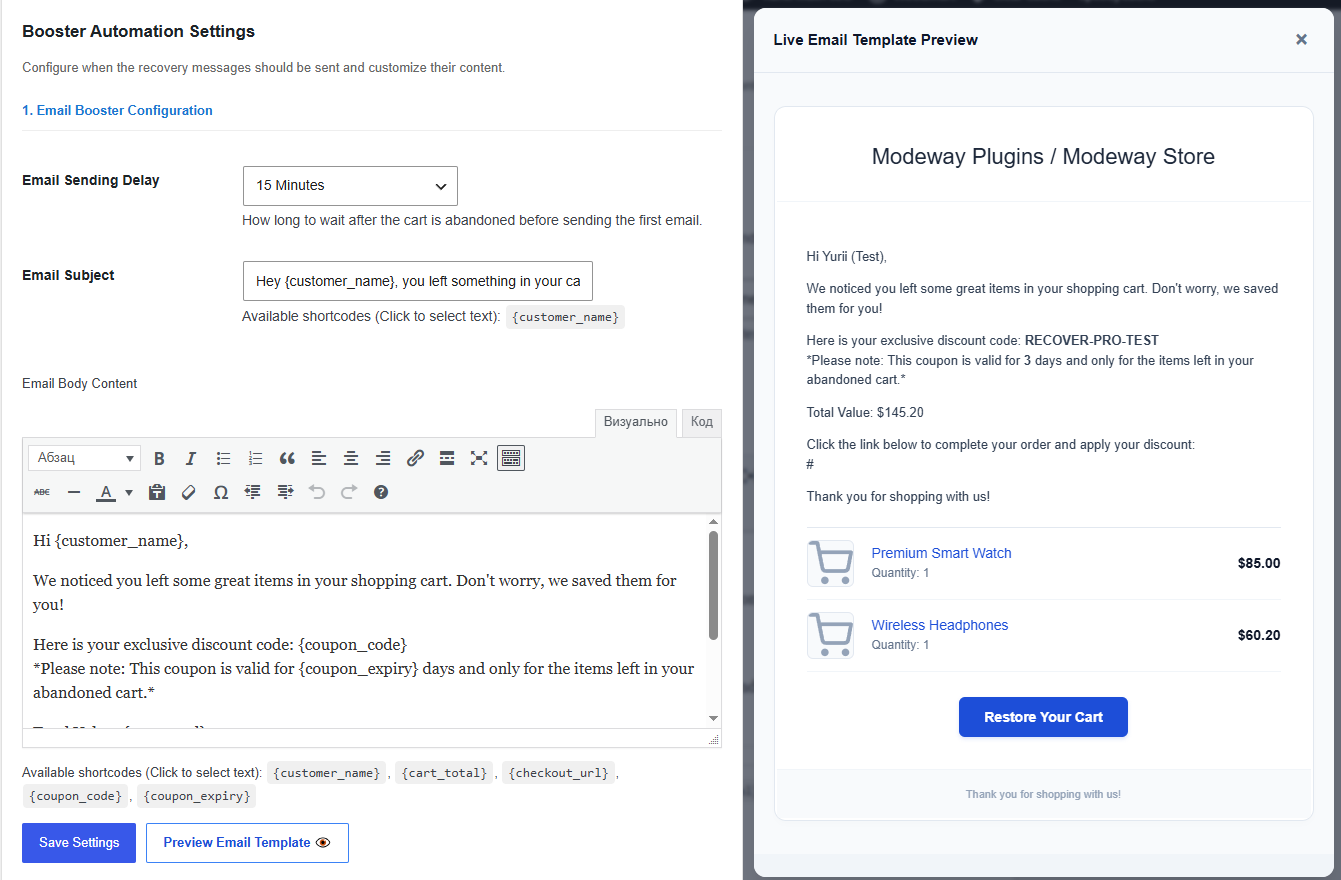
The Modeway email setup interface is equipped with a clean WYSIWYG editor (the exact same interface is used for managing SMS templates) supporting both Visual formatting and direct HTML code editing.
Template Settings:
- Email Sending Delay: A dropdown menu to select the initial delay before triggering the first email.
- Email Subject: The email subject line with native support for personalization tags.
- Dynamic Modeway Shortcodes: Shortcode text can be copied to your clipboard simply by clicking on the labels beneath the editor:
- {customer_name} — The customer's name captured on checkout.
- {cart_total} — The total value of the abandoned items.
- {checkout_url} — A unique direct URL that completely restores the cart contents on the site.
- {coupon_code} — An individual coupon code generated dynamically for this session.
- {coupon_expiry} — The lifespan of the coupon in days, creating an immediate sense of urgency (FOMO).
Modal Preview Feature (Preview Email Template)
The Preview Email Template button instantly opens your rendered email layout inside an interactive modal window right on top of the admin interface. You do not need to send live test emails to your personal inbox or waste hosting email limits—the layout, styling, and shortcode placements are verified instantly on the spot.
Dynamic Coupons & Discounts
Deliver hyper-localized shipping data automatically based on the user's geographical location:
- Individualized Generation: A unique coupon code pre-fixed with recover-XXXXX is automatically created for each specific session. It cannot be reused or shared by other users, completely preventing your discounts from leaking onto coupon code aggregate sites.
- Frictionless Checkout: When clicking the {checkout_url} link, the promo code applies itself to the checkout page automatically. Shoppers do not have to copy or paste anything.
- Item Constraints: The generated discount (percentage or fixed amount) is strictly locked to the specific product IDs that were left behind.
- Expiration Limits: The admin settings define a precise expiration lifespan in days, after which the coupon code automatically deactivates inside WooCommerce.
SMS & WhatsApp Gateways Integration
To deliver mobile triggers during the second stage of automation, Modeway connects directly to top-tier international communications providers.
Twilio Integration
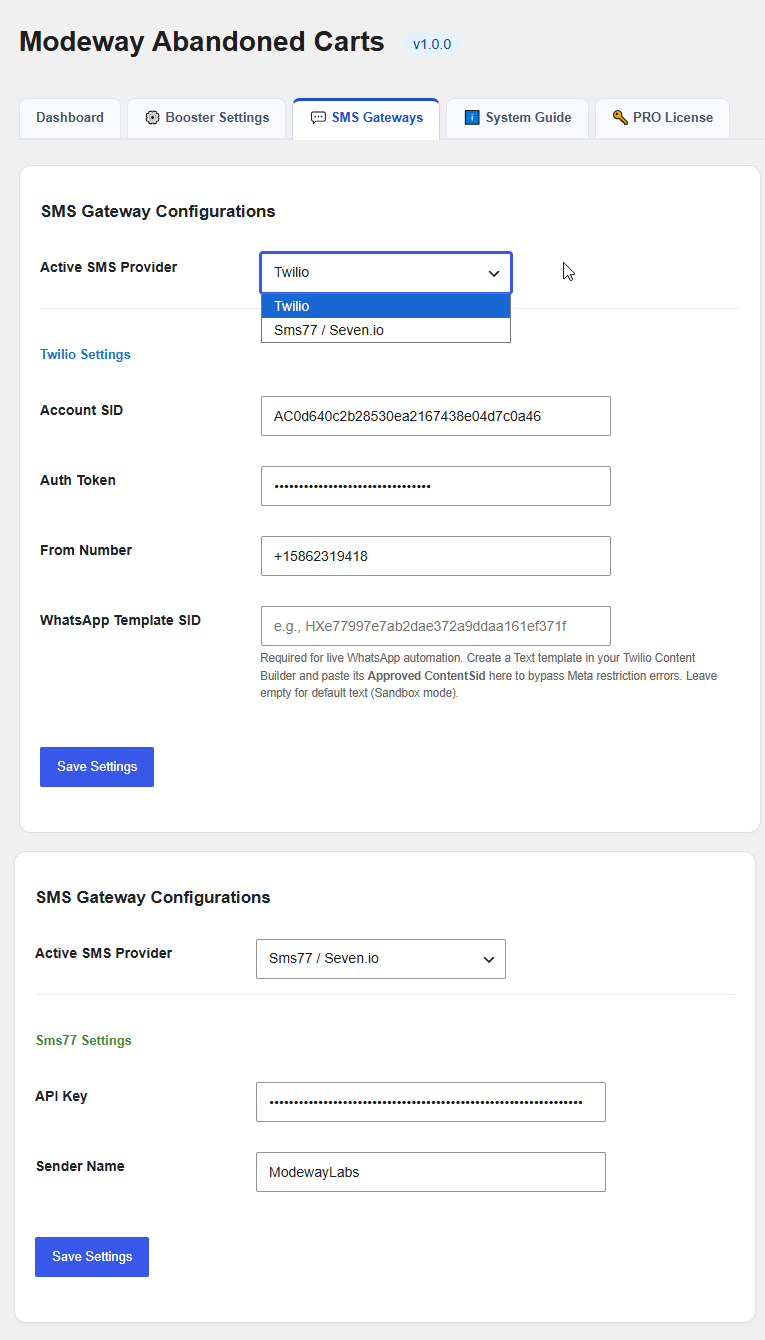
- Account SID & Auth Token: API access credentials grabbed directly from your Twilio console.
- From Number: Your leased or verified sender phone number in international format.
- WhatsApp Template SID: An input field for your Meta-approved messaging template, ensuring your WhatsApp reminders bypass carrier filters and drop reliably into the user's chat.
Seven.io (Sms77) Integration
- API Key: Secure API access token.
- Sender Name: A custom alphanumeric sender ID (up to 11 characters), allowing your brand name to show up on customers' screens instead of a generic phone number.
Cloudflare WAF & Caching Configuration
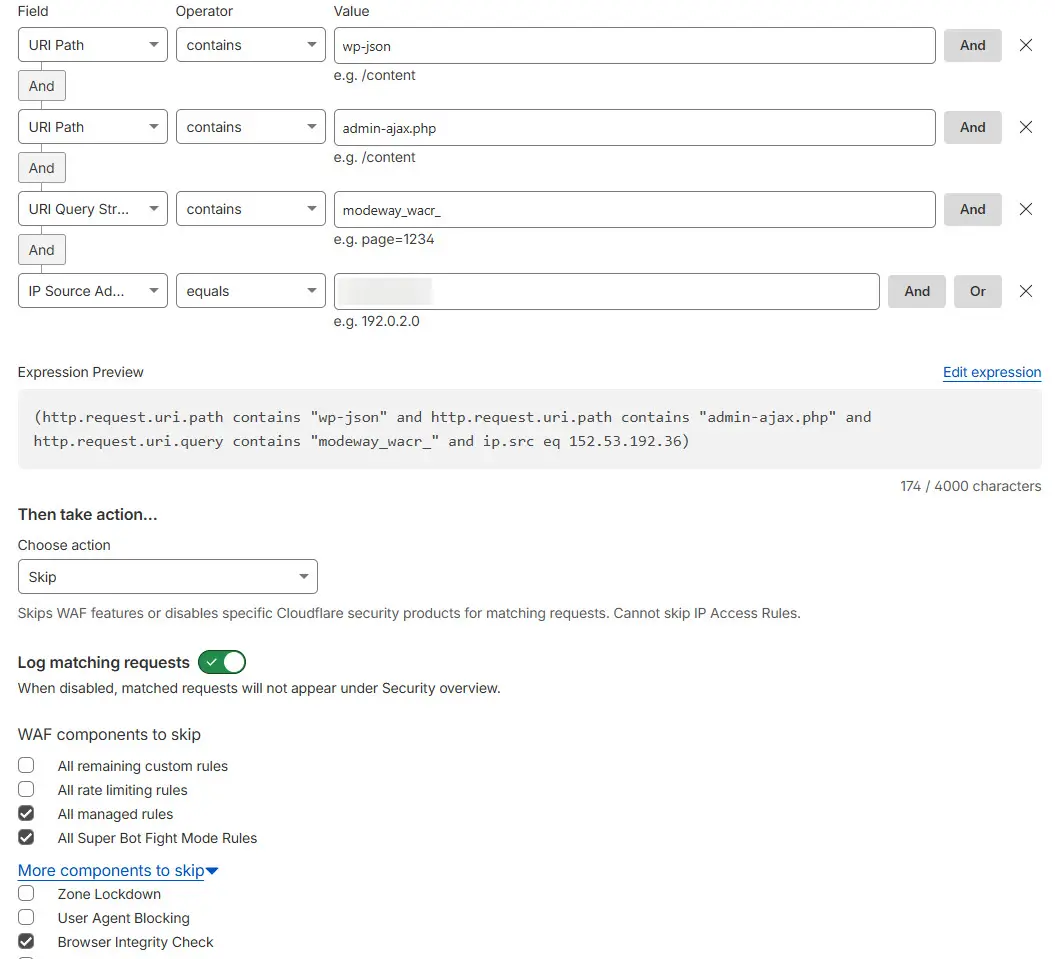
To ensure background tracking of guest cart sessions runs smoothly without being flagged by hosting firewalls or CDN networks with a 403 Forbidden error, you must set up an exception rule in your Cloudflare WAF panel.
Custom Rule Setup Configuration:
- Navigate to your Cloudflare dashboard and create a new custom firewall rule.
- Build the following condition blocks (linked via the AND operator):
- URI Path -> contains -> wp-json
- URI Path -> contains -> admin-ajax.php
- URI Query String -> contains -> modeway_wacr_
- Set the rule action to Skip.
- Choose the following security components from the checklist to bypass:
- All managed rules
- All Super Bot Fight Mode Rules
- Browser Integrity Check
- Save and deploy the rule. This guarantees uninterrupted, reliable background cart tracking on your store.