
Modeway Shipping Delivery Estimator: Official Knowledge Base & Documentation
Modeway Shipping PRO — Official Knowledge Base & Documentation
General Rules & Shipping Class Syncing
Key Performance Indicators (KPI Widgets)
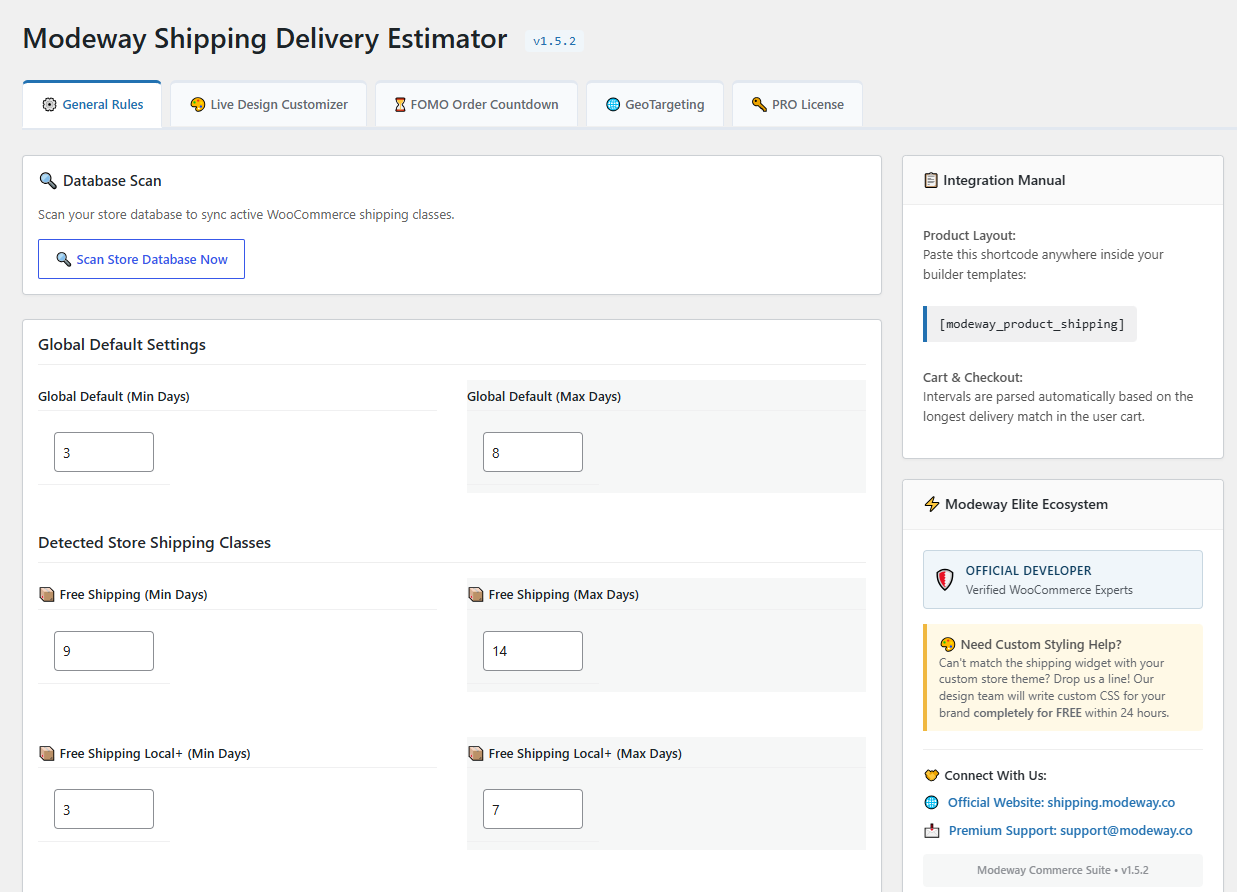
- Locate the General Rules tab to define your universal store-wide dispatch delay framework (e.g., Min: 3 days, Max: 5 days).
- These settings apply automatically to any storefront item that does not belong to a dedicated shipping class.
Automated Store Database Syncing
- Use the Scan Store Database Now action to instantly fetch all available shipping rules established within your WooCommerce setup.
- Assign completely independent, isolated business-day processing rules for custom definitions like Fast Shipping, Heavy Cargo, or Freight.
Cart Conflict Allocation Logic
If a customer compiles a complex cart including multi-tier products featuring conflicting processing thresholds (e.g., an overnight express component paired with a heavy cargo freight item requiring 14 days), the plugin employs Maximized Threshold Logic. The checkout and cart panels automatically prioritize the extended window to prevent customer miscommunications regarding fulfillment.
Advanced Live Design Studio (Customizer)
Tailor the frontend delivery badge interface seamlessly to match your brand's style guide and color rules without writing manual CSS overrides.
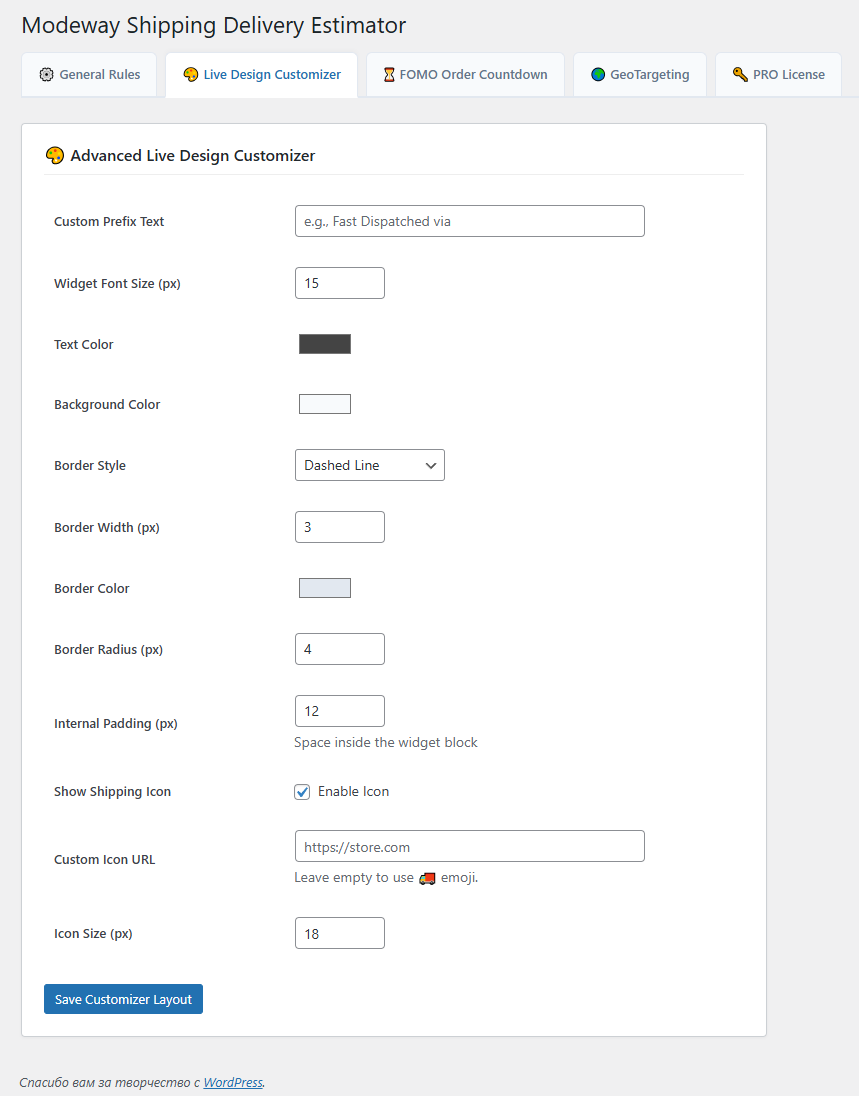
- Visual Theme Architect: Effortlessly choose between structured Boxed, Minimalist, or Borderless templates. Refine element paddings, background colors, and outer corner roundness parameters via responsive style toggles.
- Integrated Icon Library: Click Choose Image to open the native WordPress Media Library. Upload personalized SVGs, PNG assets, or custom brand icons to immediately replace the standard delivery truck icon.
- Flexible Shortcode Deployment: Output the final responsive estimator component directly inside custom product architectures using the simple [modeway_product_shipping] layout handler.
FOMO Urgency Trigger Dashboard
Drive direct storefront micro-conversions by using interactive, time-sensitive delivery countdowns to target cart abandonment behaviors.
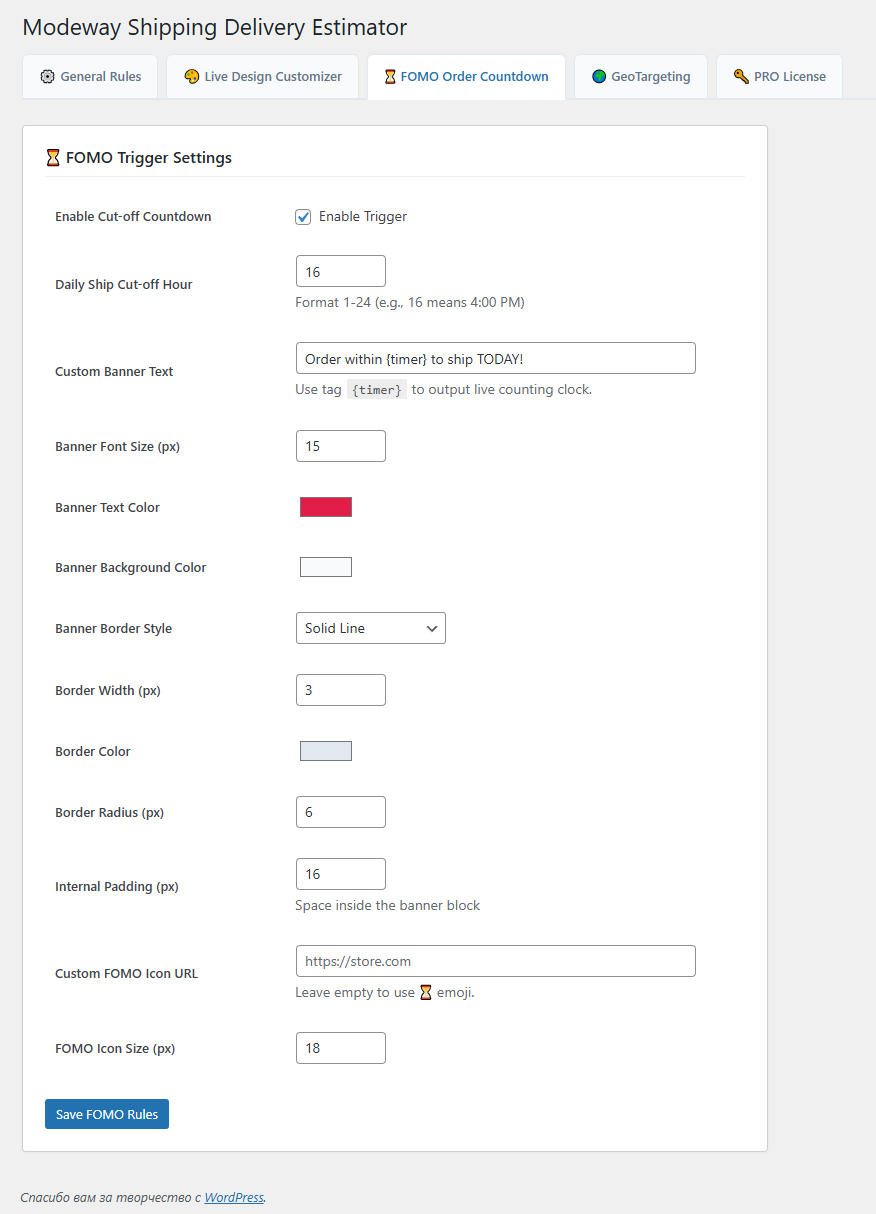
- Daily Warehouse Cutoff Hours: Specify your exact daily shipping cutoff time (e.g., 14:00 for 2:00 PM).
- Countdown Logic: The live ticking clock calculates the exact hours and minutes remaining for the customer to place their order so it gets dispatched today.
- Next-Day Threshold: If a visitor browses the store after the specified cutoff hour, the widget automatically adapts, adds 1 working day to the dispatch logic, and begins counting down to the next day's cutoff cycle seamlessly.
Intelligent Multi-Zone GeoTargeting (Geo-IP)
Deliver hyper-localized shipping data automatically based on the user's geographical location:
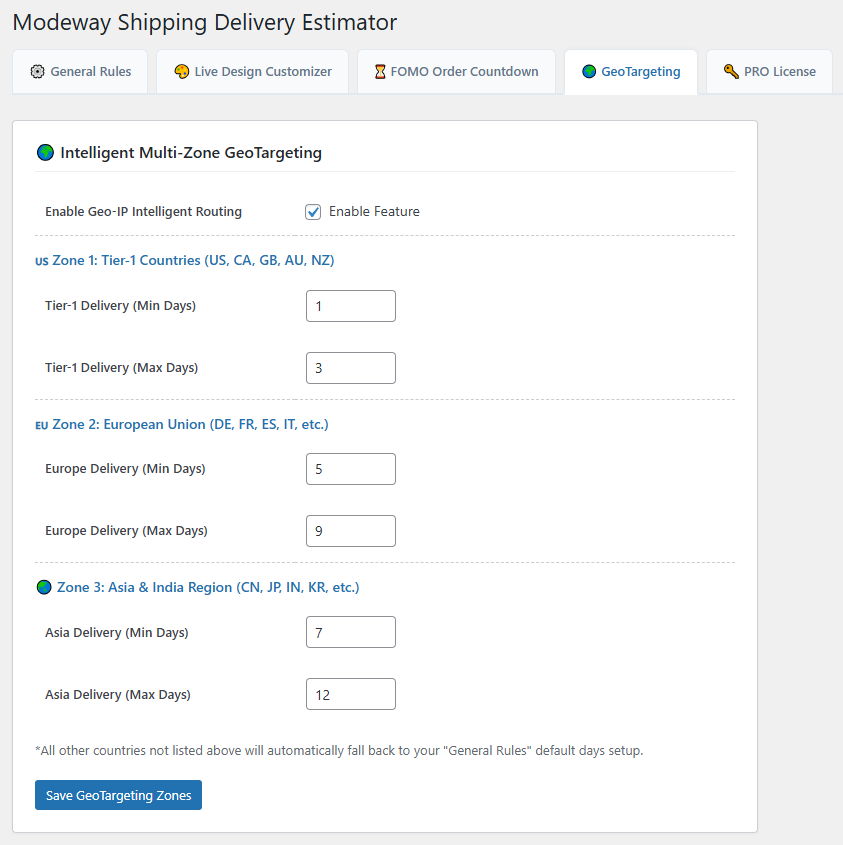
- Enabling the Feature: Check the "Enable Geo-IP Intelligent Routing" box inside the "GEO" settings tab.
- Geolocation Target Zones: Configure custom independent delivery day intervals for 3 key international market channels:
- Zone 1 (Tier-1): USA, Canada, United Kingdom, Australia, and New Zealand.
- Zone 2 (European Union): Automatically targets all active EU member states (Germany, France, Spain, Italy, etc.).
- Zone 3 (Asia & India): Optimized intervals for Eastern and Asian markets (China, Japan, India, South Korea, etc.).
- Localized Conversion Notices: When a regional match occurs, the plugin dynamically injects a localized notification string (e.g., "📍 Localized delivery options detected for Austria") perfectly aligned above the delivery badge.
Technical Troubleshooting & MaxMind Setup
If your GeoTargeting fails to switch or your Elementor page builder encounters loading stalls:
- Crucial WooCommerce Requirement: Navigate to WooCommerce -> Settings -> General. Set "Default customer location" to "Geolocate" or "Geolocate (with page caching support)".
- Free MaxMind API Registration: Sign up for a free GeoLite2 account at maxmind.com. Generate a license key from your account panel, copy it, and paste it under WooCommerce -> Settings -> Integration -> MaxMind License Key. This allows the server to fetch weekly IP mapping updates automatically.
- Troubleshooting Elementor 403 Errors: If your page builder hangs during editing cycles after turning on Geolocation, temporarily set the WooCommerce default customer location back to "Shop base address", clear your server cache using your optimization plugins, complete your layout edits, and turn Geolocation back on before launching live traffic.
Premium License Verification & API Activation
For stores maintaining active premium validation rights, managing product updates is handled through a central verification interface.
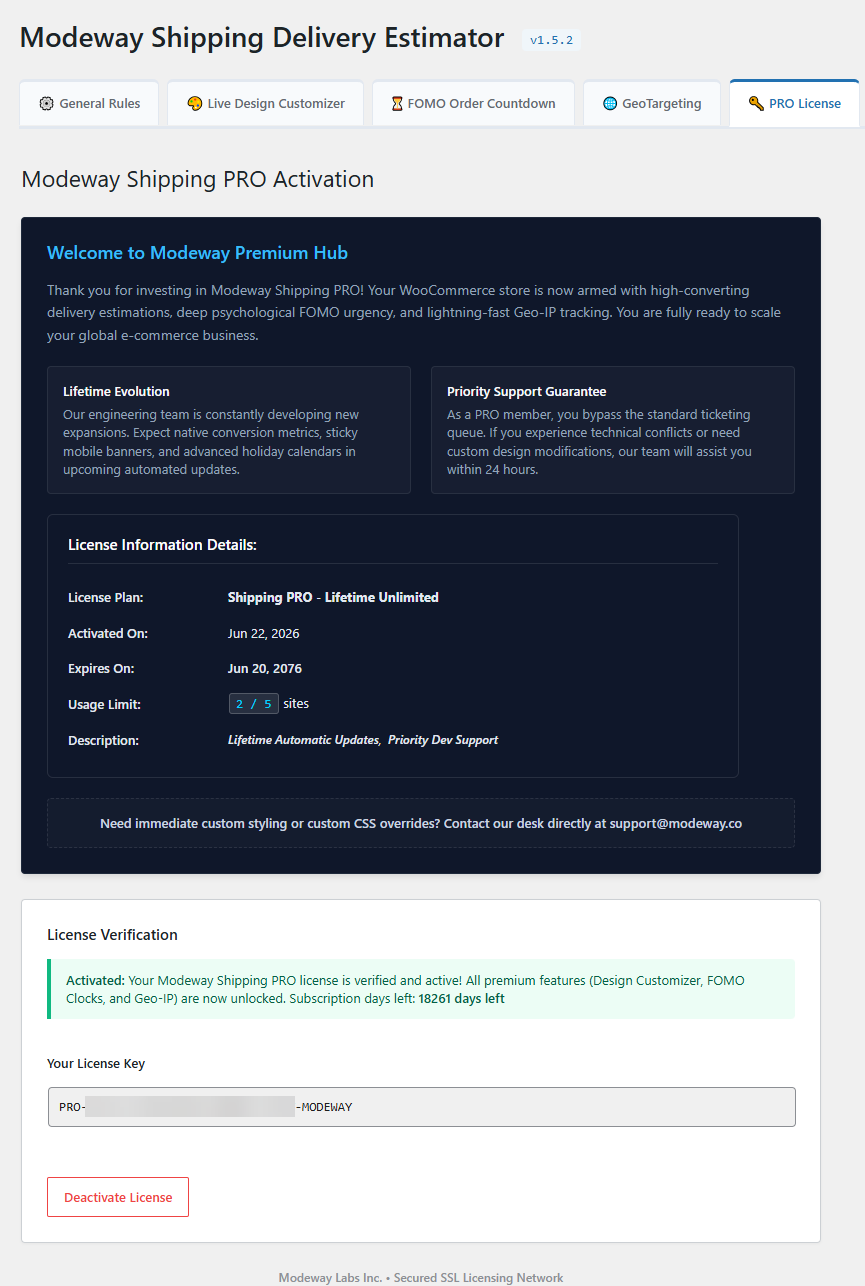
- Locate the Elite VIP Client Hub panel within your primary plugin settings workspace.
- Input your active alphanumeric license key code retrieved from your Modeway customer area.
- Click Activate License to establish a secure link with the deployment server, enabling single-click core feature upgrades and official repository security patches.